Ajar
Brightness that follows your lid. Awake that follows your work.
Featured on Product Hunt.

Open the lid.
Light rises with it.
Close it and the Mac is gone.
Brightness, keyboard, volume.
One curve maps the lid from closed to fully open. Drag a single point to shape it. Display brightness rides the curve by default. Turn on keyboard backlight and system volume to follow along.
The lid sets the fraction. Your preference sets the ceiling. Touch brightness, keyboard, or volume manually and Ajar reads it as your preference at that angle, then keeps following the lid from there.
Awake while the agent works.
macOS sleeps about five minutes after the keyboard goes quiet. AI agents in the terminal think between keystrokes, run tools, write files, then come back. The system reads all of that as idle. Claude Code, Codex, OpenCode, Gemini CLI: Ajar installs a small lifecycle hook in each, so it sees a turn begin and end instead of guessing from file activity. Awake for the turn. Asleep after.
Write your own rules too. Six conditions, combined any way you like. From the menu bar, keep the Mac awake for 30 minutes, an hour, two, or indefinitely.
Set by the hinge. Awake while the lid is lowered below an angle, or held open past one. The built-in rule fires at 60° or less, so a closed lid keeps the work going.
Close the lid on an agent mid-turn and walk away. Or add your own rule, at any angle, in either direction.
Pin to one app. Awake while it's open, or only while in front.
Logic Pro in a session. Final Cut mid-render. Xcode while a build runs.
Wait on a CLI job. Awake while a named background process is running.
Encoding with ffmpeg. Syncing with rsync. A coding agent in the terminal.
Match a network. Awake while on a Wi-Fi network you trust.
At the office desk: yes. At a cafe: no. Whatever your line is.
Wait on a volume. Awake while a specific disk is mounted.
A Time Machine pass. An external SSD plugged in. A render to a scratch volume.
Follow the cable. Awake while the Mac is plugged in.
Wide awake on the wall, normal sleep on battery.
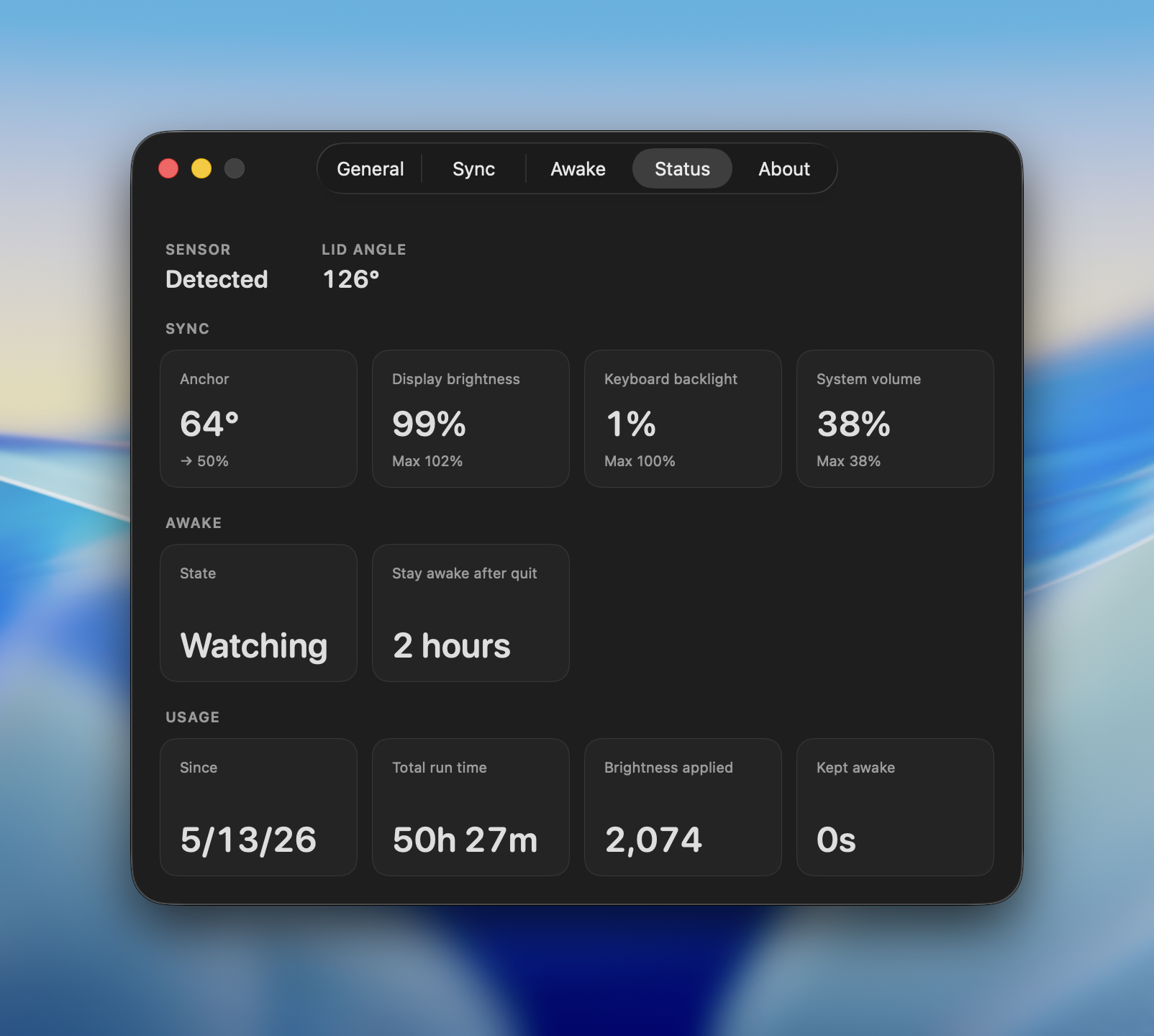
All on one screen.
One screen for the lid sensor, the synced outputs, the awake state, and lifetime counts. Useful for checking a curve at a glance, or seeing how long Ajar has kept the Mac awake.
Sensor lid angle. Sync anchor and outputs. Awake state. Usage total run time, brightness applied, time kept awake.
Where it goes to work.
Agent Care, hands off.
Claude Code, Codex, OpenCode, and Gemini CLI all report when a turn starts and when it ends. Ajar installs a small lifecycle hook in each to listen for exactly that. The Mac stays awake for the turn, no matter how quiet the keyboard. The agent finishes, the turn closes, the Mac goes back to sleep. You never had to touch a thing.
Set by the lid.
The hinge knows the exact angle. Ajar maps that angle to three outputs at once: display brightness, keyboard backlight, and system volume. One curve from closed to fully open, shaped by a single point you drag. Change rooms, change the pose, and the three settings catch up without a Control Center reach.
Until the work stops.
Final Cut renders, ffmpeg encodes, rsync overnighters, Xcode builds, training runs. The fan and the CPU graph make the work obvious, but the five-minute idle timer doesn't see it. Point Ajar at a disk that's mounted, a process that's running, a Wi-Fi you trust, or just the lid open past an angle. The Mac stays up while that signal is real and goes down the moment it isn't.
Past the toggle.
Other keep-awake apps are switches and stopwatches. Flip on, forget to flip off, drain the battery overnight. Ajar runs on signals instead: an agent mid-turn, a process alive, a disk mounted, the lid past an angle, the Wi-Fi you're on. Awake while a signal is real. Asleep the moment it drops. Nothing to set in the morning, nothing to undo at night.









Frequently asked.
Which Macs and macOS versions does Ajar support?
Every Apple Silicon Mac running macOS 15 (Sequoia) or later. We develop and test on a MacBook Pro with M4 Pro. The Awake rules run on every Apple Silicon model, from MacBook Air to Mac Studio. Sync reads the MacBook hinge sensor, so the lid-driven curve is MacBook only. On a desktop Mac, the rest of Ajar still works.
Does Sync work on external displays?
Yes. Studio Display, Pro Display XDR, and most third-party monitors connected through USB-C or DisplayPort can follow the lid. Displays Ajar cannot control, such as HDMI connections on some Macs, DisplayLink docks, or Sidecar, show N/A in Settings > Sync.
How does Awake know an AI agent is actually working?
Ajar installs a small lifecycle hook into Claude Code, Codex, OpenCode, and Gemini CLI, written into each tool's own config file. The agent reports when a turn starts and when it ends. Ajar also watches each agent's session files and keeps the rule active until they stay unchanged for a quiet period that defaults to 30 seconds and can be set to 10, 60, 120, or 300.
What happens if I adjust brightness or volume manually?
Ajar reads the new value as your preference at the current lid angle, then keeps scaling the curve from there. Manual changes anchor the curve instead of fighting it.
Will Ajar drain my battery?
Ajar keeps the Mac awake only while a rule is active, then lets it sleep after the release delay (5 minutes by default). The display still dims and sleeps on its own schedule. One thing to know: the built-in Lid Lowered rule counts a lid at 60° or less as a reason to stay awake, so a MacBook left with its lid partly lowered can keep running on battery, even after the lid closes. Turn that rule off in Settings > Awake if you want only agents and other signals to keep the Mac up.
More questions on the Ajar FAQ page.
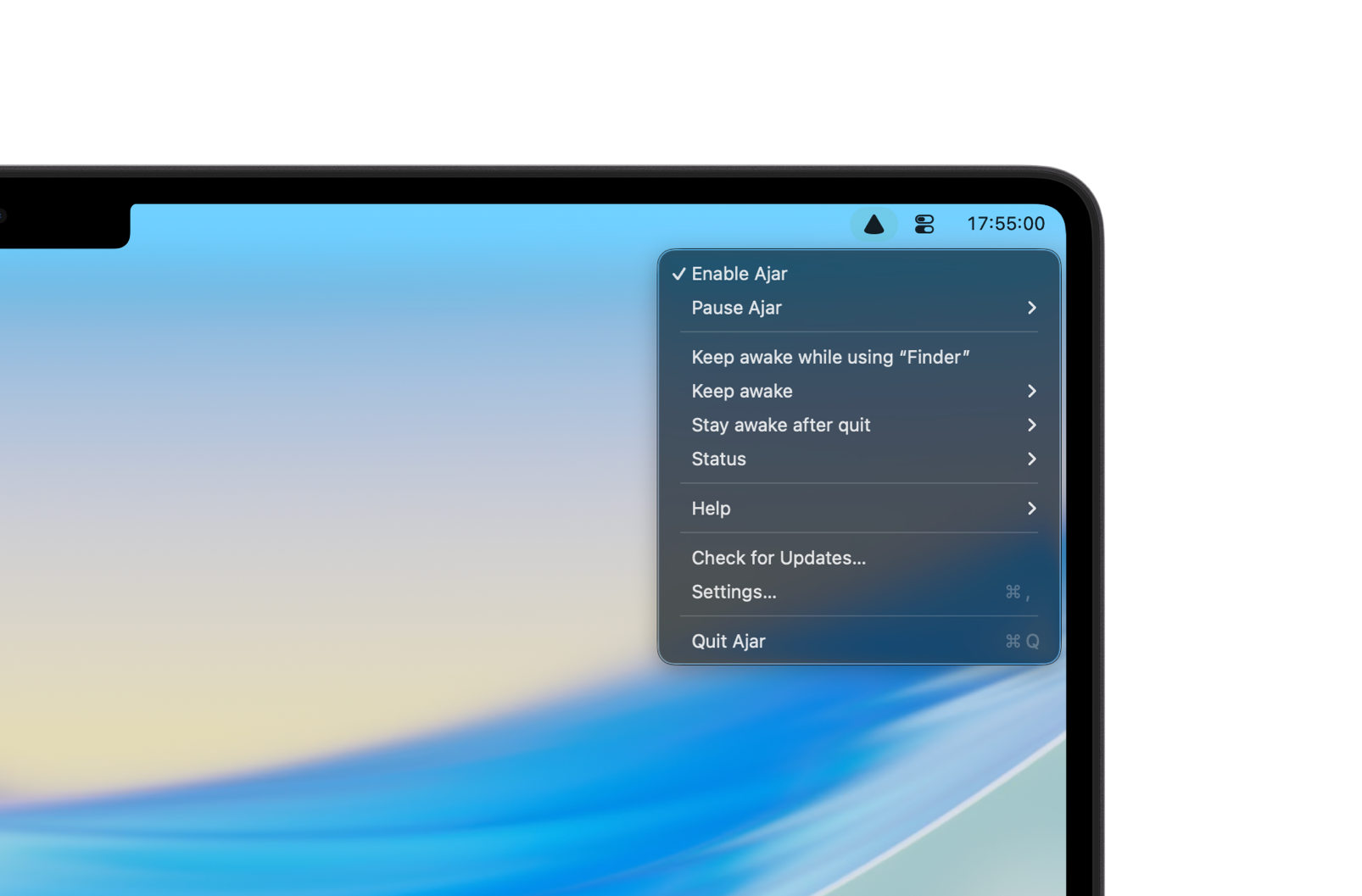
Lives in the menu bar.
Click the icon. Pause Ajar. Pick a Keep Awake duration. Open Status for the live readout.
Made for Apple Silicon Macs running macOS 15 or later.